From PDF to practice set: turning worksheets into tests students can sit
Converting a worksheet takes minutes. Checking it properly takes a little longer, and that check is what decides whether the set is worth assigning.
The workflow has four steps: convert, check, keep, assign. Convert a PDF or photo into a draft set; check and edit each question; keep the good ones in your own labelled bank; assign sets to a class with a due date. Each step has a few things worth knowing.
Step 1: Convert
On Classroom and Academy plans you can upload a PDF or a photo of a worksheet and have it converted into a draft set. Classroom includes 10 conversions a month and Academy 50; if you run out, extra conversions come in packs of 10 for ฿149 or 50 for ฿590. On any plan, including Free, you can also write sets yourself or import your own.
A few habits make conversions cleaner:
- Use the original file where you can. A PDF exported from a word processor converts more reliably than a scan of a photocopy.
- Photograph flat and square. If you are photographing a page, lay it flat in good light and fill the frame. Curled pages and shadows are where fractions and exponents get misread.
- Split long documents by topic. A 40-page packet is easier to check as several focused sets than as one long one.
Step 2: Check and edit every question
Treat a converted set as a draft, not a finished product. Before assigning it, go through each question in the editor and check:
- The answer key. This is the most important check. A wrong key does more harm than a missing question, because students who answered correctly are told they were wrong.
- Signs, fractions and exponents. −3 and 3, ½ and 1/2, x² and x2 are the usual casualties of a scan.
- Answer choices. Make sure there are the right number of choices, in the right order, and that none has been merged into another.
- Diagrams and tables. Confirm that any figure the question depends on is present and readable.
Colorbook AI can also help you build questions: drafting more questions of a type you already have, for example. The same rule applies to those as to conversions. You review and edit, and nothing reaches students until you accept it.
A realistic time budget
If you allow roughly 20 to 30 seconds per question to check a converted set carefully, longer for questions with diagrams, a 20-question worksheet takes around ten minutes to check. That is ten minutes for a set you can reuse every year.
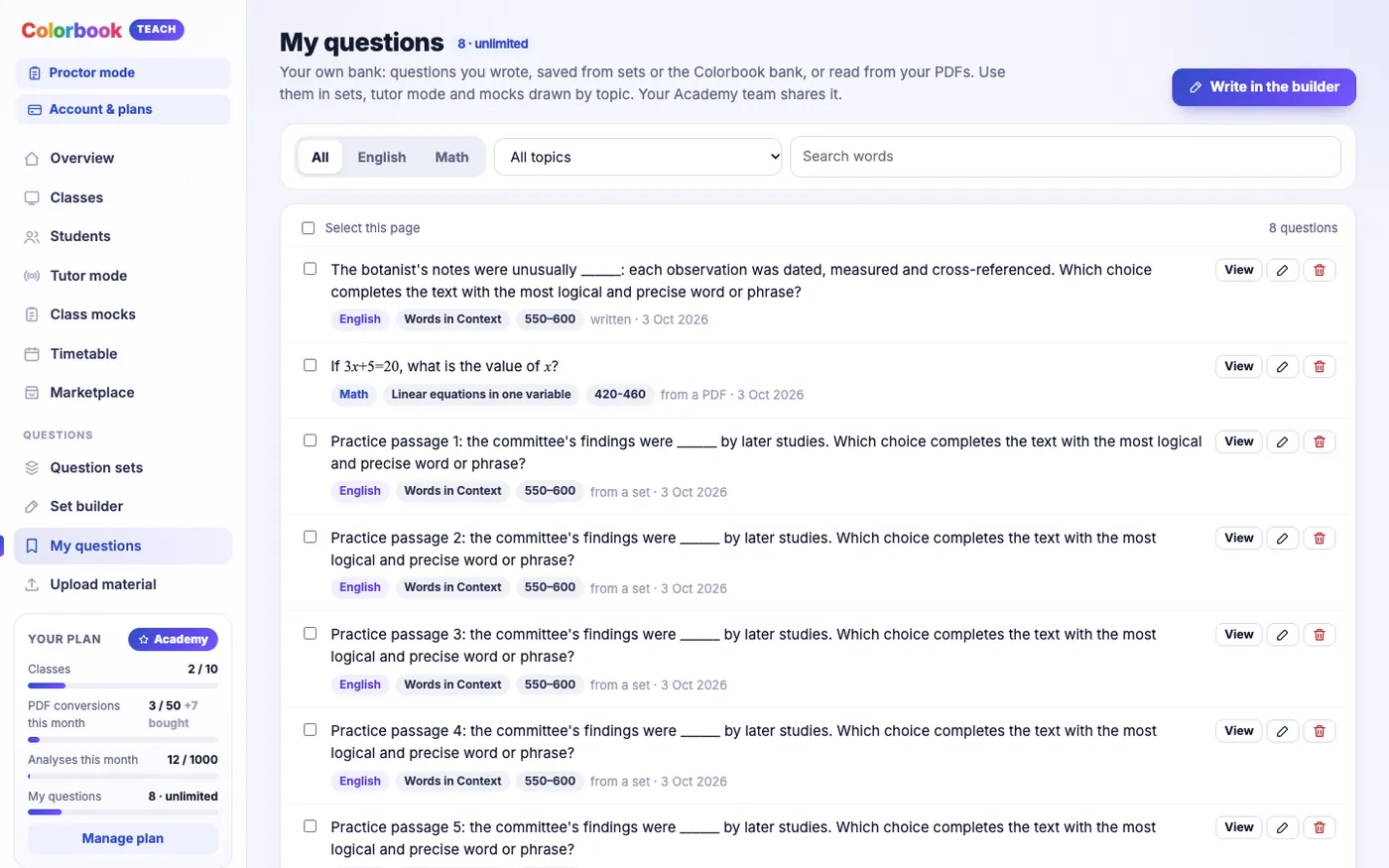
Step 3: Keep questions in My questions
Questions you keep go into My questions, your own question bank. Label each one by topic, for instance "linear equations", "transitions" or "data from a table". Labels are what make the bank useful later, because they let you:
- assemble a topic set from questions that started life on different worksheets;
- use your own labelled pool as a question source for a class mock;
- see at a glance where your material is thin.
The bank holds up to 200 questions on Free, 500 on Coach, 2,000 on Classroom and an unlimited number on Academy. If you are on Free, 200 is roughly ten 20-question worksheets, so it is worth keeping the best versions rather than every duplicate.
A practical labelling rule: use the same topic names the test uses where you can, and keep the list short. Fifteen well-used labels beat sixty that each hold two questions.
Step 4: Assign with a due date
Assign a set to a class and give it a due date. Results arrive in the gradebook as students submit, and each submission comes with a replay.
Some guidance on due dates:
- Give enough time to do it properly. A set due the next morning gets rushed. A week is a sensible default for homework.
- Leave a day before the lesson. If the lesson is on Thursday, set the due date for Tuesday or Wednesday so you can look at replays before you teach.
- Keep sets short. A focused 15-question set that students finish is more useful than a 45-question one half of them abandon.
What students see
Students see the assigned set with its due date. When they open it, it runs in the same test screen as the rest of Colorbook, laid out like the digital SAT, with its highlighter and tools. They answer, cross out choices and highlight text as they would on test day. When they submit, their work is recorded for you to replay.
This is the main reason to convert worksheets rather than hand them out on paper. Every practice set becomes a rehearsal of the test screen as well as the content, and you get a record of how each question was worked, not just the final answer.
What to watch for
- Copyright. Only convert material you have the right to use with your students, such as worksheets you wrote yourself.
- Duplicates. Converting several versions of the same packet fills your bank with near-identical questions. Keep one good version.
- Mixed difficulty. A worksheet that is all easy questions or all hard ones tells you little. Where you can, mix levels within a set so the results separate students.
Once a set has been sat, the next step is reading the results: replays and analysis explains what to look for.
Questions teachers ask
- Which plans can convert PDFs and photos?
- Classroom includes 10 conversions a month and Academy 50. Extra conversions are sold in packs of 10 for ฿149 or 50 for ฿590, and Coach, which has no monthly allowance, can buy packs too. On every plan you can write or import your own sets.
- Do I need to check converted questions?
- Yes. Check every answer key, sign, fraction, diagram and answer choice against the original before assigning. Scans in particular can misread small symbols.
- How many questions can I keep in My questions?
- Up to 200 on Free, 500 on Coach, 2,000 on Classroom and an unlimited number on Academy.
- What do students see when I assign a set?
- The set and its due date. When they open it, it runs in the digital SAT-style test screen with its highlighter and tools, and their work is recorded so you can replay it.
Bring the worksheets you already use and turn them into practice sets your students sit on screen.
See Colorbook for EducatorsMore for teachers
- Running a class mock: starting together, scheduling, question sources and timing
- Tutor mode: teaching live on the student's own test screen
- Replays and analysis: seeing how students worked, not just what they scored
- Choosing a plan: Free, Coach, Classroom or Academy
- Exam day for a class mock: what to do before, during and after