Running a class mock: starting together, scheduling, question sources and timing
A mock is only useful if the conditions are close to the real thing and the results are comparable across the class. Most of the decisions that make that happen are taken before anyone starts.
A class mock on Colorbook makes three decisions with you: how students start, where the questions come from, and how time is handled. Class mocks are available from the Coach plan. This guide goes through each choice and what to watch for on the day.
Decision 1: Start together, or let each student start
Start together from a lobby
This is the closest thing to a test hall. Students join a lobby and wait. When you start, they see a 3-2-1 countdown and the test opens in full screen. While they work you see live progress for each student, and if a student leaves full screen, that exit is reported to you.
The mock runs on the server rather than on the student's device. If a laptop restarts or the Wi-Fi drops, the student signs back in and resumes where they were. That is worth telling students before you start, because a dropped connection mid-mock is the thing that panics them most.
Use the lobby when you want everyone under the same conditions at the same time: an in-person mock in a classroom, or an online one with everyone on a call.
Schedule it with a start window
Alternatively, schedule the mock with a start window, for example any time between 9:00 on Saturday and 21:00 on Sunday. The mock appears on each student's timetable and each student starts it themselves within the window. Once started, it is timed as normal.
This suits students in different time zones or with different weekend commitments. The trade-off is that you lose the shared start, so results are slightly less comparable and you cannot watch everyone at once.
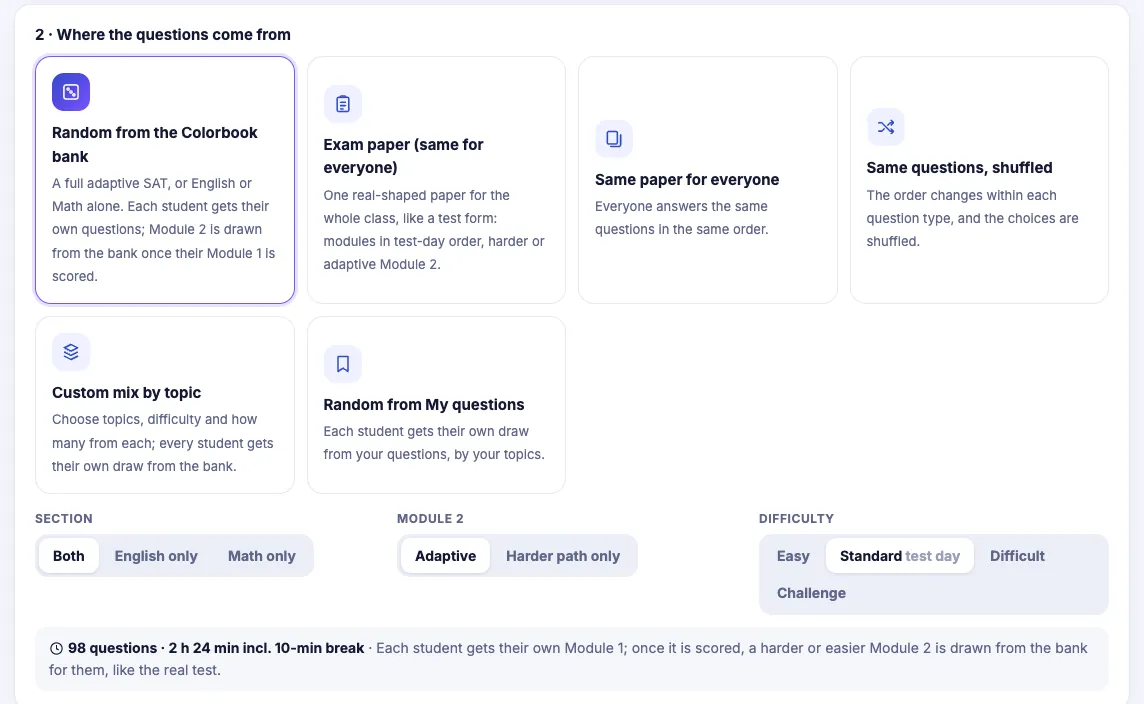
Decision 2: Where the questions come from
There are several sources, and the right one depends on what the mock is for.
| Source | What it means | Use it when |
|---|---|---|
| Same paper | Every student sits the same questions in the same order. | You want the cleanest comparison across the class and plan to go through the paper together afterwards. |
| Shuffled | Same questions, different order per student. | Students sit close together and you want to discourage glancing at a neighbour's screen. |
| Random from the Colorbook bank | Each student gets questions drawn from the Colorbook question bank. | You need fresh questions and do not mind papers differing between students. |
| Your own labelled pool | Questions drawn from your My questions bank, by topic label. | You want a mock built on material you have taught, for example a mid-term check on four topics. |
| Exam-shaped paper from the bank | A paper in the shape of the real test: English only, Math only, or a full SAT. | You want a full rehearsal of the test, timing and all. |
Exam-shaped papers and Module 2
On the real digital SAT, each section has two modules, and the second module depends on how a student did on the first. For exam-shaped papers you choose how Module 2 is handled:
- Harder Module 2. Every student gets the harder second module. Useful for a strong group, or when you want to see how students cope with the harder material.
- Adaptive. Module 1 is marked first, and Module 2 is then drawn from the bank at the right level. In English, a student who gets 15 or more of the 27 Module 1 questions right is routed to the harder module; in Math, the threshold is 12 of 22. That routing rule is Colorbook's own, not an official one, but it reproduces the most important feature of the real test: a weak first module limits the second.
The adaptive option is the more realistic rehearsal. It also gives you a useful number on its own: which students reached the harder module in each section. Module 2 and adaptive papers explains how to read each student's route.
Decision 3: Timing and accommodations
Timing follows each student's accommodations automatically. If a student has extra time, the multiplier, from ×1.25 up to ×3, is applied to their working time. The 10-minute break between sections stays 10 minutes. The timings for every multiplier are in extra time and accommodations.
On a full SAT-shaped paper at standard time, the Reading and Writing modules are 32 minutes each and the Math modules 35 minutes each. Two examples:
| Time | R&W module | Math module | Total working time | Break |
|---|---|---|---|---|
| Standard | 32 min | 35 min | 2 h 14 min | 10 min |
| ×1.25 | 40 min | 43 min 45 s | 2 h 47 min 30 s | 10 min |
| ×3 | 96 min | 105 min | 6 h 42 min | 10 min |
Two practical points follow. First, set accommodations on the student's record before the mock, not on the day. Second, if you start everyone from a lobby, students with extra time will finish later, so plan the room or the call around the longest timing, not the standard one.
Test proctors (Academy)
On Academy, you can add test proctors. A proctor can invigilate mocks and nothing else: they can start and watch a mock, but they cannot make or change anything, such as sets, questions or classes. This suits a school where a member of staff supervises the room while the subject teacher is elsewhere.
A checklist for mock day
The exam-day checklist covers each step in more detail.
- The week before: accommodations entered for every student who has them.
- The day before: students told the start time, and told that a dropped connection resumes where they left off.
- On the day: devices charged, students in the lobby five minutes early, notifications off.
- During: watch the live progress. A student stuck on the same question for several minutes, or a cluster of full-screen exits, is worth noting for the review.
- After: replay a few students on the questions most of the class missed before going through the paper.
What to watch for
- Read full-screen exits in context. One exit might be a notification; several in a row is worth a conversation. The report tells you it happened, not why.
- Do not compare random papers too closely. If every student had different questions, compare topics and timing, not raw scores to the mark.
- Review while it is fresh. A mock reviewed a week later teaches much less than one reviewed within a day or two. See replays and analysis.
Questions teachers ask
- Which plan includes class mocks?
- Class mocks are included from the Coach plan upwards. Test proctors, who can only invigilate, are an Academy feature.
- What happens if a student's device drops out during a mock?
- The mock runs on the server, so the student signs back in and resumes where they were.
- How does adaptive Module 2 work?
- Module 1 is marked first, then Module 2 is drawn from the Colorbook bank. Students who get 15 or more of 27 right in English, or 12 or more of 22 in Math, are routed to the harder module. This is Colorbook's routing rule, not an official one.
- How is extra time handled?
- Each student's accommodation multiplier, from ×1.25 up to ×3, is applied to their working time automatically. The 10-minute break stays 10 minutes.
Run class mocks in a digital SAT-style test screen, with live progress and timing that follows each student's accommodations.
See Colorbook for Educators